Author: C.J.

Installing a Secure FTP Server on IIS

Installing a Secure FTP Server on Windows using IIS You may want to install a secure FTP server on Windows either as standalone file storage or to have means of editing your website hosted on IIS (Internet Information Services) web server. In both cases, you can use an optional FTP Server component of the IIS.…
Read more


Acceptable use and privacy policy

Uploading files to a secure FTP server (sFTP)

 Upload Files to Secure FTP Server (sFTP) This guide contains a simplified description of uploading files to a sFTP server with WinSCP. Before starting you should: Have WinSCP or similar FTP client installed; Connect to your account on FTP server. Uploading Once you are connected to your account of FTP/SFTP server, you will see content of default…
Read more

fiile protection from crypto ransomeware

How to protect your small business from crypto ransomware

Crypto ransomware has come a long way over the past 2½ years and no single solution can stop it 100% of the time. But the right recovery and mitigation strategies can help. Boot Networks keep small businesses a step ahead of this virulent threat and ensure their clients are effectively protected.   How to protect…
Read more

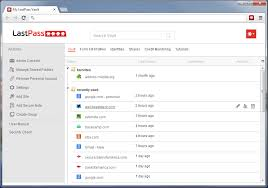
Passwords Manager Software Application

THE BEST WAY TO MANAGE PASSWORDS

STOP FORGETTING YOUR PASSWORDS! In today’s digital world, it’s imperative to constantly set unique, and complex passwords for every website that requires a login. Setting the password is the easy part, remembering them is the hard part! Lucky for you there is an APP for that. The premium password manager, LastPass. Create a LastPass account where…
Read more

remote desktop

Remote Desktop CTRL – ALT – DEL

Remote Desktop CTRL – ALT – DEL   To send the Ctrl + Alt + Del keystroke combination via RDP you actually need to use CTRL + ALT + END instead.